 5.5
5.5

Swaplse Review, Is It Worth It in 2026?
New AI photo and video generator with good anatomy, loose instructions, two video models and a free tier that didn't work
Published · Updated · Data verified
Swaplse makes good-looking stills: the light and skin read as photographs, and every hand I asked for came back with five fingers. It is loose with instructions, though. Three runs asked for exactly three cups and returned four every time, and a prompt about holding a glass came back with open palms beside it. The two video models do different jobs, V1 animating your frame and V2 filming a new scene the AI writes for you, with sound. Against that: the free starter coins were switched off when I signed up, paid runs sometimes waited close to ten minutes, and the chat in the sidebar is someone else's website. I tested on coins Swaplse credited after I reported the broken free tier.
Visit SwaplseSwaplse at a Glance
- Type
- Generator
- From
- $19.99/mo
- Free tier
- No
| Output |
|
|---|---|
| Speed | Seconds to ten minutes per photo |
| Art styles | Realism, anime, fantasy, cyberpunk, art, portraits, cosplay |
| Mobile app | No, mobile web only |
| ID verification | Not required |
Score Breakdown
Three expert ratings based on hands-on testing. How we rate
Pros & Cons
What We Like
- Believable photographic light and skin, and hands with the right number of fingers in every run
- Two video models: V1 animates your own frame, V2 builds a new shot with generated sound
- Charges matched the app's own price list to the coin across seven runs
- No visible watermark and no metadata in downloaded files
- Signup needs only an email; no card, phone or ID
- Support fixed my blocked account the same day it heard about it
What Could Be Better
- The free starter coins were switched off at signup, so a free account couldn't generate anything
- Prompts with exact counts or specific actions were ignored in every test
- The quality selector says 2K; the files are about a megapixel
- Queue waits of up to nearly ten minutes on a paid plan that promises no queue
- The Improve rewrite can't be turned off, and on V2 it replaced my scene entirely
- Coin packs only unlock with a subscription
- The sidebar chat opens girli.app, a separate service with its own account
- Card logos at checkout, crypto-only in the refund policy
What Is Swaplse?
Swaplse is an uncensored AI porn generator on swaplse.com: text-to-image, image-to-video and photo animation, all paid for from one coin balance. The sidebar also has a Chats button, which turns out to open a different website, and I'll get to that.
It reached me as a pitch in September, with an offer of a loaded test account. I turned that down and signed up like anyone else, which is how this Swaplse review ended up with two halves. The first is what a free visitor gets, and the answer was nothing. The second is what happened after I told them so, and they put coins on the account so I could actually run the thing.
The domain was registered on July 12, 2026. Two months old, no search presence to speak of, nobody else writing about it yet.
What this review is based on
- Account
- Registered on September 17, 2026 as a free user. After the free tier failed to deliver its starter coins, Swaplse credited 30,000 coins and a Plus plan to the same account on September 18 at my request. I did not pay for anything. Everything in the output sections below was generated on those coins.
- Tested
- Signup and email confirmation, the empty free balance and the error it produced, five photo generations across the fast, balanced and ultra modes, two five-second clips (one on each video model), the downloaded files themselves, queue and render times, what each run actually cost, every sidebar entry, account settings, the affiliate signup, and the terms, acceptable use, refund and 2257 pages.
- Not tested
- Cancellation and refunds, the Maximum tier and its speed claim, Edit AI, upscaling, ten and fifteen second clips, 720p on the V2 video model, and the chat service the sidebar links to.
- Cannot conclude
- Whether the queue times I hit are typical or a bad morning, how Swaplse compares with other generators on an identical prompt, and whether the free starter coins work for new accounts once the promised fix ships.
Getting Started with Swaplse
The signup form asks for a username, an email, a password and an 18+ checkbox, with Google, Discord and Telegram logins above it. No card, no phone, no ID. About forty seconds.
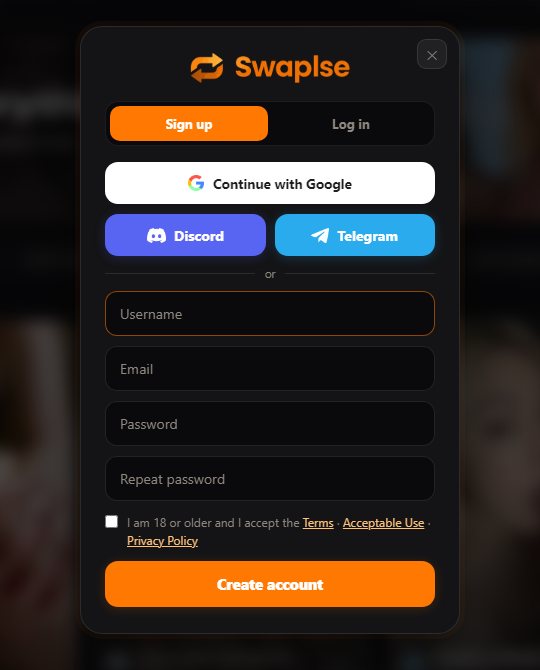
The confirmation email came through in Russian, although the site was set to English. The email, the homepage and the text under the creation panel all say the same thing: confirm your address and starter coins are credited.
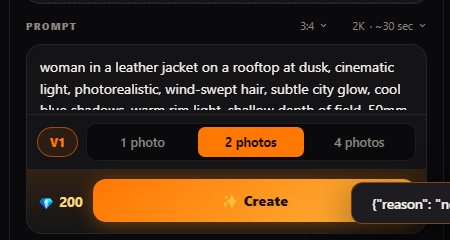
I confirmed. The account reported the address as verified and the balance stayed at Coins: 0. The reason was sitting in the site's own config, a field called signup_credits set to zero, so there was no bonus to deliver in the first place. Hitting Create on that balance returned a payment error, and the interface printed the raw server response straight into a toast:
I wrote back to the person who had pitched me. The reply came about seven hours later: they called the starter-coins message their bug, said the free allowance had been switched off while the copy still promised it, promised a fix within a day, and put 30,000 coins and a Plus plan on my account. When I finished testing the next morning, the config still said zero. So as of September 18 a new visitor gets exactly what I got on day one.
That matters for how to read everything below. I tested on coins the company gave me. The generator does not know that, the queue did not seem to care, but you should know it.
Features I Tested
- Image generationYes
- Video generationYes
- Fully uncensoredYes
- AI chat and sextingNo
- Voice messagesNo
- Roleplay scenariosNo
- Custom charactersNo
- Memory systemNo
- Face swapNo
Image generation
The image panel is a prompt box, an aspect ratio, a quality selector, the model version and a choice of one, two or four pictures per run. The price updates as you click.
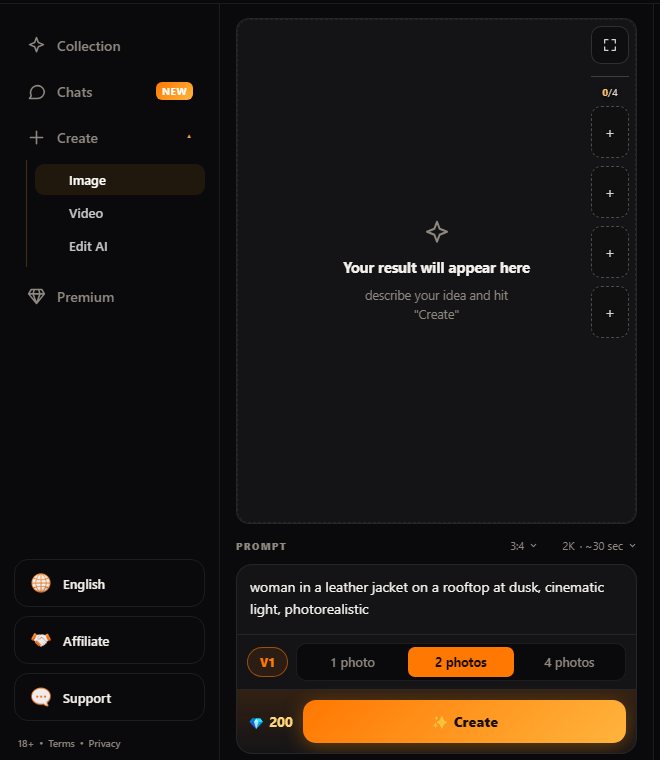
There are three quality modes behind that selector. Fast costs 50 coins a picture, balanced 100 and ultra 200, and those are exactly the amounts that left my balance on each run. Twenty style presets sit next to the panel, fourteen visible and six behind a Show more button.
The Improve step you can't switch off
Every Create press sends your prompt through a rewrite before anything renders. On photos it is harmless: my line about a woman at a café came back with "soft directional dusk light, 50mm lens, subtle film grain" bolted on. On video it is not harmless at all, and I'll show you why in the output section. The tooltip on the video model button says it plainly: "Before the run, AI refines the description for it." There is no toggle.
Video: two models that do different jobs
The video tab needs a starting image, up to 15 MB, and offers 5, 10 or 15 seconds. The first time the tab opened on a paid account, a "What's new in V2" window explained the split: V1 animates a frame, V2 "shoots a scene" using your photo as a face and body reference, with sound generated in the same pass. Both of my five second runs cost 1,500 coins. A V2 clip at 720p is listed in the config at 2,400.
Uncensored means uncensored
I ran one explicit prompt, an adult woman in a bedroom, to see whether the uncensored claim holds. It generated without a refusal or a blur. I looked at it locally and it is not on this page, which is our policy for explicit output rather than a comment on the result.
The AI chat is a different website
The pitch and the affiliate page both sell AI character chat as part of the package, under one account. The sidebar has a Chats button with a NEW badge. Click it and a new tab opens on girli.app, a separate AI girlfriend service with its own signup, its own Premium tier and its own ten free messages. Nothing carries over, not the login and not the coins. I clicked every other sidebar entry too; all of them stay on swaplse.com. So the chat is an outbound link dressed as a tab, and I didn't review Girli here.
The app's own price list, read from inside my account, also carries lines for face swap, voice messages and per-minute calls. None of those appears anywhere in the swaplse.com menus I clicked through, so I've left them out of the feature list rather than count a price line as a product.
Output Quality: What Came Back
I don't test with flattering prompts. I test with ones that can fail: a countable number of objects, hands doing something specific, a named prop in a named place.
The café test, three times
Prompt: a woman in a green dress at a small round café table with exactly three white coffee cups, a red umbrella leaning against her chair, street at dusk. I ran it on balanced, then ultra, then fast.

That is the balanced result, untouched apart from resizing. As a photograph it's good: the dusk light on the stone, the dress fabric, the wet pavement, the wicker chair. The umbrella is where I asked for it. There are four cups.
Ultra, at twice the price, gave me four cups again, slightly crisper detail in the chairs and the street, and a road sign in the corner covered in letters that aren't letters. Fast gave me four cups, a smaller picture, and the umbrella leaning against a different chair. Three runs, three modes, zero correct counts. That isn't unusual in this category, but it is the kind of instruction a generator either follows or doesn't, and this one doesn't.
Hands
Prompt: a close-up of a woman holding a wine glass with both hands, all ten fingers visible, one silver ring on her left ring finger.

Five fingers on each hand, clean knuckles and nails, one ring. That's the part most generators still get wrong, and Swaplse got it right. She isn't holding the glass, though. Her palms are open on either side of it, like she's showing it to you. Anatomy yes, action no.
What "2K" means in the file
The quality selector reads "2K". The files I downloaded from balanced and ultra were both 896 × 1200 JPEGs, which is about a megapixel. Fast came out at 672 × 896. Asking the image endpoint for "full", "original" or "large" returns the same 896-pixel file. Ultra buys you more detail inside the frame, not more pixels.
No visible watermark on any of the five. No EXIF data either, and no C2PA or XMP block, so nothing in the file says it was made by AI or where. Good for the person downloading; worth knowing if you care about provenance.
Video: V1 keeps your frame, V2 replaces it
I gave both models the same frame, the ultra café picture, and the same line: she slowly turns her head toward the camera and smiles, the umbrella stays still, light rain starts behind her.

V1 animated my picture. Same café, same dress, same umbrella, the same four cups. Over five seconds she turns and smiles, the camera drifts in a touch, and her face holds together through the turn. It came out at 720 × 960 with no audio track. The rain never started.

V2 did something else. The Improve step had turned my line into a new scene, a woman standing on a wet street in a dark coat, holding an open red umbrella, and V2 filmed that script instead of my frame. The face and hair resemble the source; the café, the dress and the chair are gone. It did turn and smile, it did have rain, and it had sound: street ambience and rain on a real audio track. At 480 × 864, it's the lower-resolution of the two.
So pick the model by the job. If you want your picture to move, V1. If you want a new shot with that face in it and you're fine with the AI writing the shot for you, V2.
Queue times on a paid plan
The plans promise a fast queue measured in seconds, and the affiliate page talks about an RTX 5090 fleet with no crawl. Here is what I timed, from pressing Create to a finished file:
| Run | Mode | Waiting in queue | Start to finish |
|---|---|---|---|
| Café | balanced | at least 3 min | about 5 min |
| Hands | balanced | under 10 s | 31 s |
| Café | ultra | under 10 s | 20 s |
| Café | fast | 4 min 47 s | 5 min 8 s |
| Explicit test | balanced | 9 min 14 s | 9 min 45 s |
| Clip, V2 | 5 s, 480p | under 1 min | 2 min 40 s |
| Clip, V1 | 5 s, 720p | about 30 s | 2 min 15 s |
Rendering itself was quick every time, twenty to thirty seconds for a photo. The waiting was the problem, and it was unpredictable: balanced mode took 31 seconds on one run and nearly ten minutes eight minutes later. Three of my five photo runs took five minutes or more from click to file, almost all of it spent waiting, on a plan that says there is no queue.
The gallery counters
The header tabs advertise Images 1.2M and Video 214K. The listings behind those tabs report 2,254 images and 2,324 videos, and the whole public feed totals 4,578 works. My own generations were numbered 9,705 to 9,714, and the newest public work was 8,493. Those are the sizes of a site with a few thousand pictures, not a million.
Interface and Account Settings
The interface is further along than the rest of the product. Tabs for Home, Categories, Video, Images and Edit AI, a works search with a trending strip under it, and a gallery where each piece shows its author and like count. Your own output stays private in Collection until you publish it.
Settings are unusually complete for a two month old site: passkeys, two factor by app or SMS, a public profile page, notification channels, and a delete-account button that deletes immediately and says so. A few seams show. The language page says only Russian and English are live, the sessions list says multi-device history is "coming soon", and the job status while a clip rendered read "Считаю видео", Russian for "rendering video", on an English interface.
Swaplse Pricing and the Coin System
| Plan | Price | What you get |
|---|---|---|
| Premium | $19.99 per month | 50,000 coins a month (about 500 default photos), full 18+ generation, unlocks coin purchases |
| Ultimate | $29.99 per month | 150,000 coins a month, video and animation first in line, 4K upscaling, priority GPU |
| Maximum | $49.99 per month | 500,000 coins a month, advertised 4x generation speed, top priority GPU |
Cost per Generation
Based on Premium ($19.99/mo, 50,000 coins), 50000 coins a month included:
That's roughly 500 images or 33 videos per month on your subscription alone.
Swaplse cost is a coin balance topped up by a monthly plan.
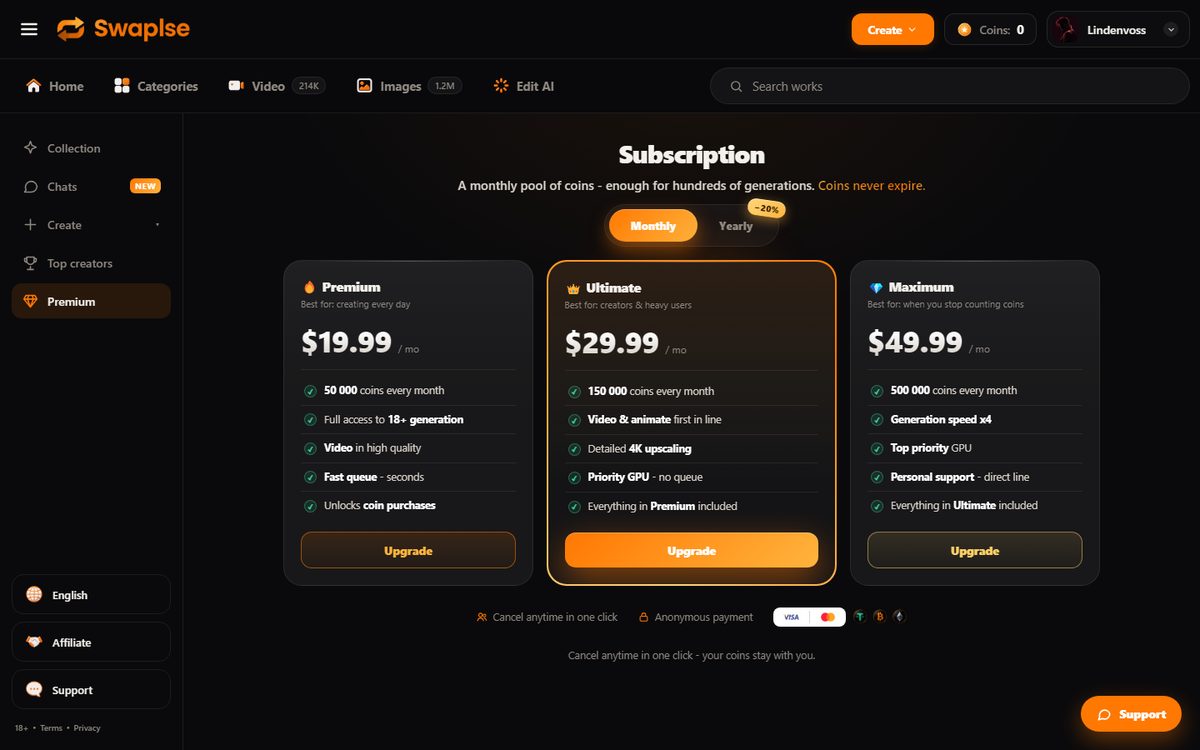
Premium is $19.99 a month for 50,000 coins, Ultimate $29.99 for 150,000 and Maximum $49.99 for 500,000, with 20% off annually. The last line of the Premium card reads "Unlocks coin purchases": coin packs are not a separate product, a plan switches them on, and the Coins menu entry just opens the plans page. The Plus plan they put on my account isn't on that page at all.
Here is the price list the app runs on, next to what was actually taken from my balance:
| Operation | Price list | Charged to me |
|---|---|---|
| Photo, fast | 50 | 50 |
| Photo, balanced (panel default) | 100 | 100, three times |
| Photo, ultra | 200 | 200 |
| Clip, 5 s, V1 | 1,500 | 1,500 |
| Clip, 5 s, V2 at 480p | 1,500 | 1,500 |
| Clip, 10 s / 15 s, V2 | 2,500 / 3,750 | not run |
| Clip, 5 s, V2 at 720p | 2,400 | not run |
The charges matched the list to the coin, 3,550 in total across seven runs. The copy around it is less tidy. The page FAQ says video "starts at 2,500 coins for a five-second clip"; in the list, 2,500 buys ten seconds and five seconds is 1,500. The same config also carries a 400-coin "video 5s" line that neither video path in the interface ever charged.
On Premium, that works out at four cents for a balanced photo, eight on ultra, two on fast, and sixty cents for a five second clip. The per-picture price is fair. The entry price is what you notice: the free route is dead until they ship the fix, so the first generation costs a $19.99 month.
Is Swaplse Worth the Money?
Once you're inside, the coin prices are reasonable and honest: every charge matched the list. The cost is at the door and in the wait. Until the free coins return, the first picture costs a month's plan, and on a paid plan I still waited close to ten minutes for one of them.
Privacy and Safety
The legal pages are all there and written as prose rather than boilerplate: terms, acceptable use, refunds, a 2257 exemption statement, privacy, cookies, GDPR and DMCA, all dated August 2, 2026. The acceptable use rules ban minors in any form, images of real people without consent, and passing generated output off as real footage.
No KYC, no card stored, and your works stay private until you publish them. The downloaded files carry no metadata at all.
Payment is where the story splits. The affiliate page and the pitch say Visa, Mastercard and crypto, and the plans page shows card logos. The refund policy on the same domain says payment is accepted in cryptocurrency against an invoice, the service does not accept or store card details, and a refund to a card is not possible. The support FAQ adds a third version: if your card is declined, press "Pay with an operator" and someone in chat finds a method for your country, including gift cards, and credits the coins by hand. I didn't pay, so I can't tell you which of those you'll meet. Ask support before you do.
Swaplse vs Alternatives
Here's where it sits among the generators I've tested.
- Photo plus two video models, V2 with sound
- Anatomy good, counts and actions unreliable
- No working free tier yet, plan needed to buy coins
- Crypto invoices, no metadata in files
- Images, 1080p video and an AI editor
- Free Express queue generates in about eight seconds
- From $2.99/mo
- PornWorks AI review
- Images and GIFs
- Gem economy with a usable free lane
- From $9.99/mo annual
- CreatePorn review
- Video first, image-to-video
- Credit packs with no subscription lock-in
- Around $30 to $50 per pack
- SpicyGen review
- Images plus a light chat mode
- Free tier with daily generations
- From $9.99/mo
- PornX review
PornWorks AI starts cheaper, lets you generate on a free queue and outputs larger files, so for stills it is the easier recommendation. Swaplse is more interesting on video: the V1 and V2 split, with sound on V2, is a choice the other tools I've reviewed here don't give you, even if V2's rewrite takes control away from you.
What Users Say About Swaplse
Nothing yet. I found no Reddit thread, no Trustpilot page, no forum post and no other review; searching the name mostly returns an unrelated service with a similar spelling. That is normal for a two month old domain and says nothing bad on its own. It does mean you'd be early.
What I can add is how they handled a complaint. I told them the free tier was broken, in writing, with the evidence. They answered the same day, owned it as their bug and gave me what I needed to test. That's one data point, and it was a good one.
Who Should Use Swaplse?
Best for: someone who wants photorealistic stills with believable hands and light, plus the option to animate their own frames, and who is happy to pay for a month before the first picture. If you mostly want a face you've generated to appear in new moving scenes with sound, V2 does that, as long as you accept that it rewrites the scene for you.
Skip if: you want to try before paying, because until the fix ships there is no free generation at all. Skip it too if your prompts depend on exact counts or specific actions, if you need output above roughly a megapixel, or if a ten minute wait on a paid plan would bother you. If free matters, start with the free AI porn sites list, and for AI video specifically there are cheaper places to start.
Swaplse Review FAQ
Is Swaplse free?
Signing up is free and the site promises starter coins on email confirmation. On September 17 and 18 that bonus was set to zero, which Swaplse told me is a bug they're fixing. Until it ships, a free account can browse the gallery and can't generate anything.
How much does Swaplse cost?
Plans are $19.99, $29.99 and $49.99 a month for 50,000, 150,000 and 500,000 coins. A photo costs 50, 100 or 200 coins depending on the mode and a five second clip 1,500. On the cheapest plan that is about four cents per default photo.
Can you buy Swaplse coins without a subscription?
No. The Premium plan lists "Unlocks coin purchases" as a feature, so coin packs only open once you're on a plan.
Is Swaplse really uncensored?
Yes. An explicit prompt generated without a refusal or a blur on my account.
Does Swaplse add a watermark?
Not on anything I downloaded. The five photos had no visible mark and no metadata of any kind in the file.
How fast is Swaplse?
Rendering takes twenty to thirty seconds for a photo and a couple of minutes for a five second clip. The queue in front of it varied from nothing to over nine minutes on a paid plan.
How big is the Swaplse gallery?
The header claims 1.2M images and 214K videos. The listings serve 2,254 images and 2,324 videos, with 4,578 works across the whole public feed.
Is Swaplse legit?
There's a working product behind it: the generator, the video models, the gallery and the legal pages all function, and support fixed my problem within a day of hearing about it. The rough edges are real too, from the broken free tier to the chat that belongs to another site. Treat it as a new service that works, with copy that runs ahead of it.
Similar Tools We Reviewed

Comparing on price? See the cheapest AI porn generators, real prices side by side.
Ready to Try Swaplse?
Registration is free and the site promises starter coins on email confirmation. When I tested on September 17 and 18 the bonus was set to zero in the app's config; Swaplse called it a bug and promised a fix. Until it ships, a free account can browse the gallery but can't generate.
Visit Swaplse